Wednesday, October 29, 2008

Building an Observable Model in Silverlight

Now that Silverlight 2 has been released .NET web developers can begin writing rich Internet applications in languages like C# and VB.NET which they know and love.  However if you have spent the last few years developing web applications using ASP.NET you may have developed certain habits that will not serve you well in when writing Rich Internet Applications.  Undoubtedly one of those habits is avoiding state.  Sure you could always use the view state or worse, the session state to store information across page loads.  However it's generally advisable to use as little state as possible to maximize the scalability of your ASP.NET applications.  It's important to unlearn this behavior now that Silverlight 2 has been released. 

Repeat after me: "State is good." 

Client state, this is.  Modern hardware is fast and memory is cheap.  Part of building rich Internet applications is leveraging all that juice to transform what users expect from web applications.

Of course this calls for a very different set of design patterns than the ones we use to build stateless applications.  In the RIA world it is no longer necessary, nor efficient, to destroy and recreate objects all the time. However if we keep objects around a long time we run the risk that they will get into inconsistent states.  An example of this problem is an application not updating the status bar and disabling the "Save" menu item when a new file is loaded in a text editor application.  The problem of synchronizing UI elements gets exponentially more complex as more UI elements are added.

One way of keeping long-lived view objects synchronized with each other is to design an observable model.  Many of your favorite MS applications (ex. Visual Studio, Office) use this model.  I'm not going to explain the observable model to you in detail because it has been explained very well by others already.  To summarize, in an observable model view objects subscribe to model objects and are responsible for updating themselves when the model changes.  It sounds simple but it is a very powerful way of managing complexity in UI's because you can add new types of view objects without touching the code in either the model or the other views.

In this blog post I want to show you how to create an observable model in Silverlight.  Let's use Silverlight Charts as an example, partly because it's a simple example of an observable model in Silverlight and partly because I just spent the last three months working on it with Delay (and others) so it's fresh in my mind.  

The Observable Model in Silverlight Charts

The Silverlight Chart has a collection of axis controls, series controls, and a legend control with a collection of UIElement's.  All of the elements in the various collections have to be inserted into the Chart's (or Legend's) visual tree.  The Chart (and Legend) needs to detect changes to their collections and add or remove the UIElements from visual tree accordingly.  Obviously the controls also need to be removed from the template parts when they are removed from the collection.  In this case the collections make up the model and the Chart and Legend's panel template parts are the views.

The Model
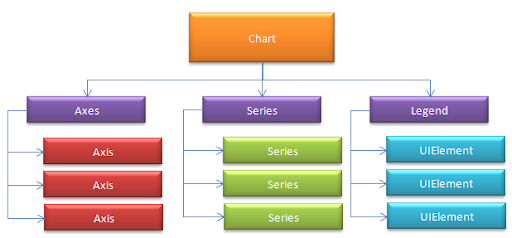
chart

The View

visualtree

Responding to Collection Changes

In the .NET framework there are several interfaces we have available to us to help us create an observable model.  You may be familiar with the INotifyCollectionChanged interface in the System.ComponentModel namespace.  It raises an event that informs listeners of what changes occurred in the collection.  There is also a handy object that implements it called ObservableCollection<T>.  The ObservableCollection is a good choice for our model collections.  It even implements IList so it can be populated in XAML like so:

<charting:Chart Title="Typical Use"> <charting:Chart.Series> <charting:BarSeries Title="Population" ItemsSource="{Binding PugetSound, Source={StaticResource City}}" IndependentValueBinding="{Binding Name}" DependentValueBinding="{Binding Population}"/> </charting:Chart.Series> </charting:Chart>

When the Series observable collection is changed the Chart responds by synchronizing the objects in the collection with those in the SeriesContainer template parts.

Responding to Property Changes

Although not shown above there is another template part behind the SeriesContainer called the GridLinesContainer.  This is where the grid lines control associated with a particular axis are inserted so that they appear behind the series.  The axis exposes the GridLines control it wants inserted into the GridLinesContainer via it's GridLines dependency property.  The Chart must detect changes to this property and ensure that the control exposed via this property is inserted into the GridLinesContainer template part.

You're probably already familiar with INotifyPropertyChanged.  Implementing this interface allows a object to signal to the UI that it has changed.  Although it might look like this would be the interface to use it is not appropriate in this case.  Since axis is a control and its GridLines property is a dependency property, a more appropriate way of exposing changes to it is to expose a DependencyPropertyChanged event of type DependencyPropertyChangedHandler<T>. 

There are three advantages to using DependencyPropertyChangedHandler:

1.  It is generic and is therefore statically typed.

2.  It provides both information about both the old and new value.  This makes it easy for the chart to find the old control and remove it. 

3.  It is a routed event which will provide more flexibility as Silverlight matures and incorporates more WPF features for handling routed events.

Overcoming Limitations

Synchronizing property values or responding to property changes is more challenging in Silverlight than in WPF.  There are a few limitations you should be aware of:

No Notifications on Custom Dependency Properties

Binding objects that bind to custom dependency properties (those that you create yourself vs. those that are native) are not able to detect when a property's value changes.  As a result if you bind two custom dependency properties together the bound property will only be set once regardless of how many times the source property is changed.  One way of overcoming this limitation is expose dependency property change events for the custom properties you would like to bind together and synchronize their values in the event handlers.

No Multi-Bindings

The solution to this problem is similar to the previous one.  Hook the property change events of several dependency properties and do your aggregation operations in code instead of inside of a value converter.

No Way of Getting a PropertyDescriptor for a Dependency Property

There's no way of getting a property descriptor for a dependency property in Silverlight.  As a result this wont work:

DependencyPropertyDescriptor descriptor = DependencyPropertyDescriptor.FromProperty (UIElement.VisibilityProperty, typeof(UIElement)); descriptor.AddValueChanged (this.labelShowHide, new EventHandler(VisibilityChanged));

So how do you listen for a change to a native dependency property?  One solution to this problem is to create a private attached dependency property in your class (assuming it inherits from DependencyObject), bind it to the native dependency property, and hook the PropertyChanged event of your attached property.  This will work:


public void ListenForChangeToProperty(string propertyName, UIElement element) { Binding b = new Binding(propertyName) { Source = element }; element.SetValue(HiddenAttachedProperty, b); } private static readonly System.Windows.DependencyProperty HiddenAttachedProperty = System.Windows.DependencyProperty.RegisterAttached( "HiddenAttached", typeof(double), typeof(MyClass), new System.Windows.PropertyMetadata(OnHiddenAttachedPropertyChanged)); private static void OnHiddenAttachedPropertyChanged(System.Windows.DependencyObject dependencyObject, System.Windows.DependencyPropertyChangedEventArgs eventArgs) { UIElement source = dependencyObject as UIElement; double value = (double) eventArgs.NewValue; // Respond to changes to property }

An Observable Model is a Beautiful Thing

It's like a guitar that is always in tune no matter how hard you thrash.  While the aforementioned limitations do make it very difficult to create observable models declaratively, Silverlight provides the necessary interfaces and delegates so that you don't need to reinvent the wheel.  Although you'll be writing more code in Silverlight than in WPF you'll still find that it's surprisingly easy.  Now that you have some tricks to help you overcome the known limitations you should embrace this pattern so that you can deliver the rich UI's your clients expect without spending your weekends tracking down bugs at the office.

Tuesday, October 28, 2008

Silverlight Toolkit Released!

The Silverlight Toolkit was released today! I, along with the rest of the Platform Presentation Controls team have been toiling on this release for months and we couldn't be more excited. ImplicitStyleManager As some of you may have been able to figure out from my last post I wrote the ImplicitStyleManager control which brings WPF-style implicit styling to Silverlight applications. It's a good example of functional programming in the wild (with available source to boot) and I'm very proud of it. For more information on what you can do with it stay tuned. Also be sure to check out Beatriz Stollnitz's blog. She was responsible for testing this control and without her efforts it would not be nearly as usable. I'll post more about this when I get the chance. The API's pretty self-explanatory so I'll focus on the implementation. Silverlight Charts The big one which I've been working very hard on (along with Delay and a few other developers who I wont mention as I haven't gotten their permission yet) is the Silverlight Charts. Be sure to check out Delay's blog for an intro to charting. In the coming days I'll be blogging about the architecture of the solution. I feel extremely fortunate to have gotten the opportunity to play a key role in the development of a control that will be around for such a long time. Since it is brand new we were given free reign to come up with the API and architecture. These opportunities don't come along every day. I would be posting more about it right now but I've taken a well-deserved couple of days off. :-) Couldn't resist a short blog post though. Enjoy the controls!

Monday, October 27, 2008

Silverlight and the Logical Tree

Those of you familiar with WPF may experience some disorientation when acclimating to Silverlight.  Although Silverlight has certain new and exciting capabilities currently lacking from WPF there are certain features missing  from Silverlight which you have come to know and love.  One of those features is the logical tree.  The official word from Microsoft is that the logical tree is not necessary in Silverlight because it does not support ElementName bindings.  That said there is a trick you can use if you would like to figure out if an element is the logical ancestor or descendent of another element: confirm that the other object is in the same name scope.  You can always find out if two elements are in the same name scope by calling the FindName method on one and passing in the name of the other object.

element.FindName(otherElement.Name) == otherElement

But what if an object does not have a name?  Well the answer is simple: you give it one.  It is relatively easy to ensure that each object has a unique name by creating a GUID.  Although it is unpleasant to assign names to elements in the visualtree for no other purpose than to determine if they are logically related to other elements it is currently the only way of discerning the information that I'm aware of.  Of course better ideas are always welcome. :-)

Using this trick we can write a logical tree helper class like the one available in WPF.  However instead of using the same API as WPF let's change it a little to make it more Linq friendly.  First we'll write  a GetVisualChildren function that returns the visual children as a sequence.


/// <summary> /// Retrieves all the visual children of a framework element. /// </summary> /// <param name="parent">The parent framework element.</param> /// <returns>The visual children of the framework element.</returns> internal static IEnumerable<DependencyObject> GetVisualChildren(this DependencyObject parent) { Debug.Assert(parent != null, "The parent cannot be null."); int childCount = VisualTreeHelper.GetChildrenCount(parent); for (int counter = 0; counter < childCount; counter++) { yield return VisualTreeHelper.GetChild(parent, counter); } }

That was easy.  Now we can run Linq queries on the visual children of an element.  Now let's write a function that recurses down the tree depth-first and grab every immediate descendent that is in the same name scope of the element.  In the interest of speed we'll manage the stack ourselves.

public static class LogicalTreeHelper { /// <summary> /// Retrieves all the logical children of a framework element using a /// depth-first search. A visual element is assumed to be a logical /// child of another visual element if they are in the same namescope. /// For performance reasons this method manually manages the stack /// instead of using recursion. /// </summary> /// <param name="parent">The parent framework element.</param> /// <returns>The logical children of the framework element.</returns> internal static IEnumerable<FrameworkElement> GetLogicalChildren(this FrameworkElement parent) { Debug.Assert(parent != null, "The parent cannot be null."); EnsureName(parent); string parentName = parent.Name; Stack<FrameworkElement> stack = new Stack<FrameworkElement>(parent.GetVisualChildren().OfType<FrameworkElement>()); while (stack.Count > 0) { FrameworkElement element = stack.Pop(); if (element.FindName(parentName) == parent) { yield return element; } else { foreach (FrameworkElement visualChild in element.GetVisualChildren().OfType<FrameworkElement>()) { stack.Push(visualChild); } } } } }

The EnsureName function just checks to see whether an element has a name and names it if it does not. There you have it: a LogicalTreeHelper for Silverlight. 

Friday, October 24, 2008

Silverlight and Anonymous Types: A Cautionary Tale

As you may or may not know know I've been working hard on Silverlight controls for the last few months. I know this blog is covered in a thin layer of virtual dust but I want to say this to the three of you left who haven't dropped me from your RSS readers in disgust: "I'm back baby." No, really. Get ready for a flurry of posts on Silverlight 2 and our upcoming controls. You can read more about them on my boss's blog. Not everything I've been working on has been announced yet (nothing in fact) so until PDC I will have to keep it general rather than specific. However after Tuesday no amount of pleading e-mails will be able to get me to shut up about Silverlight controls. So stay tuned. To whet your appetite I'll tell you a cautionary tale about a developer who found his love of functional programming and Silverlight in direct conflict.

Once upon a time there was a developer who was hired by Microsoft to write Silverlight controls. This developer understood well the benefits of functional programming and had been dutifully using query comprehensions, anonymous types, and closures whenever possible. His code was terse and declarative. Life was good. One day the tester visited the programmer. "Anonymous types are forcing our code coverage down. The compiler generates a GetHashCode function and a ToString function for them and and our test can't cover them." The developer was initially dismissive of the tester's concerns. He saw limited value in covering compiler generated code. The true coverage numbers were much higher he reasoned. Denial. "Anonymous types also account for about 15% of our DLL size." Moments later our developer regained consciousness, dazed and confused, and began to crawl out from the ton of bricks that had fallen on him. This was another problem entirely. He hadn't given a moments thought to executable size. After all, how much code could really be generated by an itty-bitty little anonymous type? var rootNode = new { Node = node, Resources = node.GetResources() };

Turns out...a lot. A class with constructor, two properties, a structural equality overload, a ToString overload, and a GetHashCode overload. The developer groused and complained that the compiler should be able to detect and omit the unused code. Anger.

The developer bargained, telling himself that he would use anonymous types sparingly, only in cases where omitting them would detract from the clarity of the code. Finally he accepted the fact that he couldn't subject users to longer download times for the sake of his high-minded ideals. He swore to never use anonymous types again...in Silverlight.

The moral of the story is it's important to avoid casually using anonymous types in Silverlight projects. This is more difficult that it seems because sometimes you are using them without even knowing. How many anonymous types do you think are generated by the following code?

var types = from type in this.GetType().Assembly.GetTypes() let name = type.FullName orderby name ascending select new { Name = name, Type = type, SuperClass = type.BaseType };

The answer is two. Let statements generate anonymous types. Under the hood an anonymous type was created for the name and type pair in addition to the triple that is actually returned from the query.

The dilemma: How to be a good developer and write stateless, declarative code while respecting your end-users precious time?

1. DON'T use the query syntax.

Many people find query comprehensions very readable, especially when doing joins. The problem is that it's too easy to inadvertently create anonymous types.

2. DO use tuples.

A tuple is an immutable generic class that is basically identical to an anonymous type but without the named properties. You can use it again and again without bloating your assembly. Here is a triple, which is like a tuple but with three properties instead of two. internal struct Triple<T0,T1,T2> { public T0 First { get; private set; } public T1 Second { get; private set; } public T2 Third { get; private set; } public Triple(T0 first, T1 second, T2 third) : this() { First = first; Second = second; Third = third; } }

We also need one last thing, a nice helper class to create them for us. The reason we need a helper class is that constructors don't support type inference. It's certainly no fun typing...

new Triple<string,Type,Type>(name, type, type.BaseType);

..is it. I have a FunctionalProgramming static class I use (which I usually alias to FP):

public static FunctionalProgramming {
public Triple<T0,T1,T2> Triple(T0 first, T1 second, T2 third)
{
return new Triple<T0,T1,T2>(first, second, third);}
}
}

Once you've built yourself a triple and a helper class you're ready to go. Now we can rewrite the code above:

var types = this .GetType() .Assembly .GetTypes() .Select(type => FP.Triple(type.FullName, type, type.BaseType));

Tuples are used in functional programming to return multiple values and as a way of temporarily grouping related objects. There's no reason why you can't use them in C# in lieu of anonymous types.

And so our story comes to an end. With a little adjustment the developer continued to use Linq in his Silverlight project to create terse, declarative code and lived mostly happily ever after.

Wednesday, July 2, 2008

Multimethods in C# (Part 2)

In part 1 I demonstrated how to use my multimethod library in C#:

var collision = DynamicDispatch.CreateFunc<SpaceObject,SpaceObject,bool>((obj1, obj2) => this.Collision(obj1,obj2));

// dispatches to Collision(XWing xWing, TieFighter tieFigher)
collision(new XWing(), new TieFighter());

Although it appears that CreateFunc accepts a lambda function, in reality the type of its argument is a lambda expression. A Lambda expressions is the data representation of a lambda function. The CreateFunc functions analyzes the lambda expression and retrieves the overloads of the function invoked in the expression. Finally it generates the code to do a dynamic dispatch based on the argument types and returns a delegate of type Func<>.

Based on the type of the arguments passed to the collision delegate it invokes the correct method overload at run-time. In order to generate the code for this delegate I use the objects defined in the System.Linq.Expressions namespace. The code for the collision method looks something like this:


This may look a little complicated but really it's not. I simply create a function for each overload that attempts to cast the arguments to the concrete types expected. If any of the arguments are null, which they will be if the "as" operator fails, the process is repeated for the next overload until finally it reaches the most abstract overload.

So how is this done? Well first we must get a list of all the overloads and sort them in the appropriate order, from most abstract to most derived.


Some of the functions used here warrant some explanation. Iterate is a function that accepts a starting argument and a function and then generates a stream that takes an initial value, returns it, and then returns the results of recursively applying the function to the previous value. In other words FP.Iterate(0, x => x + 1) yields the following stream: 0,1,2,3,4,etc. In this case I use Iterate to walk up the inheritance tree of a type and find out what its depth is. Since the Iterate function is stateless and returns a stream I can use it in a Linq query. I sort the overloads by the max depth of any type in a given overload, and then by the sum of all the argument depths. Note that I sort the overloads in ascending order from most abstract to most derived instead of vice-versa. The reasons for this are clear when you examine how I build the expression.


Due to the fact that I want to build the expression using functional programming I will have to build it inside out recursively, starting with the most abstract function and ending with the most derived function. The reason for this is that more derived functions must call the most abstract functions, meaning they must exist before the derived functions are created. In order to achieve this I use a very versatile function: Enumerable.Aggregate. Aggregate takes an initial value, a function that accepts two arguments, and a stream. The first argument to the function is the initial value passed to the Aggregate. The second argument is the current item in the stream. Every time the function passed to aggregate is run the result is used for the accumulator variable. For example the following code yields 10:

var nums = new[]{1,2,3,4};
var output = nums.Aggregate(0, (x,y) => x + y);

Aggregate can work on anything, not just numbers. In this case my stream contains all the overloads, my accumulator variable is the expression I've built so far, and the function creates a new expression that invokes the current overload if the types match or invokes the expression in the accumulator if they don't.

This approach works well and is very elegant, but aren't we forgetting something?

What if instead of this...

collision(new XWing(), new TieFighter());

...the following code is run:

collision(new TieFighter(), new XWing());

Whoops! It wont match our first overload even though that would probably make the most sense under the circumstances. Within each handler we could write some manual code to try and reverse the arguments but that is exactly the kind of drudgery we want to avoid. Next time I'll show you how to modify our algorithm to generate code to try all the various combinations of argument orders.

Why are dynamic languages so...static?

<Rant> I'm frustrated by the glacial pace of evolution we see in the dynamic language space, specifically in the area of parallelism. This article on Ars Technica echoes what many of us have long suspected: the future is massively parallel. It was so obvious to me that the way to write parallel programs was not to deliberately assign certain types of tasks to certain cores that I was genuinely surprised at how wide-spread the practice was. We need to start expressing programs in such a way that they can be scaled to as many cores as there are available without developers having to manage the process. When you are dealing with 16, 32, 100+ cores it's no longer about making efficient parallelism easier. It about making it possible. Nobody's that good and if they tell you so they're lying. There is no silver bullet and there are many tasks that just can't be done in parallel. However the key to democratizing parallel programming is to give developers a clean way to express algorithms as stateless programs (read: functional programming), and give them access to their language's parse tree. Languages like LISP, ML, C#, VB.NET, and Perl 6 (if it is every released) expose the syntax tree to the developer allowing them to leverage the most important idea in computer science. Libraries can analyze this parse tree and rewrite it to run efficiently in a variety of different hardware scenarios. Given that the multi-core future is bearing down on us it's only natural to assume that the various popular programming languages would be scrambling to add the necessary idioms to support parallelism. Not so much. Ruby's got some functional programming constructs, but no way of getting at the AST. Python was just redesigned from the ground up and there was a grand total of zero language features added to support parallelism. Javascript was just moved to 2.0 and is similarly lacking. What's so criminal about this omission is that it is so easy to rectify. When you call "eval" an AST is created somewhere. It's simply a matter of exposing it before converting it into executable code. I just wrote a rudimentary chess AI in C# 3.0. I achieved just short of 4x speed increase on my quad-core simply by adding a single line of code and referencing the new ParallelFX CTP. I challenge anyone to achive a similar level of code clarity and performance with the dynamic languages en vogue today. </Rant>

Wednesday, June 25, 2008

MS has hired me

Sorry about the blog hiatus but I have a decent excuse: Microsoft has hired me on as a Senior Developer on the Silverlight team. Obviously I'm ecstatic. I'm going to be moving to Seattle and I'm hoping to start work on August 4th at which point I will resume posting.

About Me

My photo
I'm a software developer who started programming at age 16 and never saw any reason to stop. I'm working on the Presentation Platform Controls team at Microsoft. My primary interests are functional programming, and Rich Internet Applications.