Thursday, March 19, 2009

Bug: Explicit Styles Replaced by ISM in Silverlight3 Version of Toolkit

As many of you are aware we've just released a new version of the Silverlight Toolkit.  Rest assured it is a high-quality release that is chock full of great new controls and compelling features.  Unfortunately a bug in the SL3 version of ISM slipped through.  This bug causes ISM to replace styles you've explicitly set.  This issue also affects the themes. 

Given the following XAML...

<Grid theming:ImplicitStyleManager.ApplyMode="Auto"> <Grid.Resources> <Style TargetType="Button"> <Setter Property="Foreground" Value="Green" /> </Style> <Style x:Key="customStyle" TargetType="Button"> <Setter Property="Foreground" Value="Red" /> </Style> </Grid.Resources> <Button Content="This should be red." Style="{StaticResource customStyle}" /> </Grid>

...ISM should ensure that the style explicitly set on the button takes precedence over the other style in the Grid's resource dictionary.  Unfortunately it replaces the explicit style with the implicit one:

shouldbered

The good news is that you can replace the references to the System.Windows.Controls.Theming.*.dlls in the Silverlight 3 Toolkit with the ones in the newest version of the Silveright 2 Toolkit (available here) and everything will work just fine.  You will still get access to all the new themes and bug fixes.  In fact there is no difference between these two assemblies other than this bug.

Sorry for the inconvenience.

Writing Your Own Silverlight Chart Series (Part 1): Making Designers Happy

In the latest release of Silverlight Charts, new features took a backseat to stabilizing our architecture and improving performance.  For the intrepid developer the time is right to take the plunge and start experimenting with your own series.

BewareSilverlight charts is still in preview mode and there may be breaking changes in the future despite our best efforts to avoid them.

In this series of blog posts I will explain how to implement your own series in Silverlight charts.  I will assume you already know how to create Silverlight controls and are familiar with Silverlight/WPF concepts such as the visual tree and templating.  If you aren't comfortable with these concepts I advise you to drop by www.silverlight.net and make your way through the excellent tutorials.

Introducing the Stock Series

One of the series that is available in Excel but is currently missing from Silverlight Charts is the Stock Series.  The stock series displays a high, low, and close value on a given day.  Here's an example from Excel:

blogimage0

Let's see if we can implement the stock series using the extensibility points provided by Silverlight Charts.

"Designers, Designers, Designers!"

One of the biggest benefits of Silverlight is that control developers can decouple a control's model and its visual appearance.  This means that designers can use tools like Expression Blend to give our controls the professional treatment.  Finally design-challenged developers can create glassy, beveled controls that impress our clients, friends, and family. 

Our goal is to take advantage of Silverlight to give the designer as much flexibility as possible to customize our series' appearance.  This post explains how to do this.

Setting up the Project

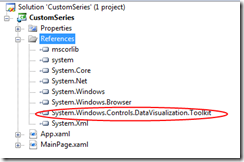
First create a new Silverlight project and import the System.Windows.Controls.DataVisualization.Toolkit.dll from the newest version of the Siverlight Toolkit.

blogimage1 

Now we're ready to start adding the files we need for our Stock Series.

Creating the StockSeries Control

One of the things to keep in mind about Silverlight Charts is that everything is a control.  In addition to the Chart control which acts as a container, each individual series and the axes they use are also controls.  This is great news for designers because they can completely change the visual appearance of a control by replacing its template.  It's also great news for developers because the Control base class provides a variety of useful methods and properties.

Since our StockSeries is a control we need to go through the same steps required to create any control in Silverlight:

1.  Add the StockSeries Class

using System.Windows.Controls.DataVisualization.Charting; namespace CustomSeries { public class StockSeries : Series { public StockSeries() { this.DefaultStyleKey = typeof(StockSeries); } public override void Refresh() { } } }

Our StockSeries inherits from the abstract Series base class, which in turn inherits from Control.  The only method we need to implement is the "Refresh" method.  When this method is called a series is expected to go back to its data source and render everything from scratch.  We'll get to this method later.

2.  Add a Default Style for the StockSeries Control.

a) Add a folder called "Themes" to the root of the project.

blogimage2

b) Add a new XAML file called "generic.xaml" under the root.

blogimage3

c) Add a resource dictionary with a default style for the StockSeries class to the "generic.xaml" file

<ResourceDictionary xmlns:x="http://schemas.microsoft.com/winfx/2006/xaml" xmlns="http://schemas.microsoft.com/winfx/2006/xaml/presentation" xmlns:local="clr-namespace:CustomSeries"> <Style TargetType="local:StockSeries"> </Style> </ResourceDictionary>

d) Set the build action of "generic.xaml" to "Resource".

blogimage4 

3.  Add a Default Template for the StockSeries class

A control's template contains the objects used to render its visuals.  Since a StockSeries plots objects in two dimensional space it makes sense to include a Canvas in its template.  The StockSeries will use this canvas to arrange its data points. 

In order to add a template to our StockSeries control we must add a setter to the default style in the "generic.xaml" file.

<Style TargetType="local:StockSeries"> <Setter Property="Template"> <Setter.Value> <ControlTemplate TargetType="local:StockSeries"> <Canvas x:Name="PlotArea" /> </ControlTemplate> </Setter.Value> </Setter> </Style>

Now that we've added the canvas to our StockSeries template we will declare that it is a "Template Part" by adding the TemplatePart attribute to the top of our class.

[TemplatePart(Name = "PlotArea", Type = typeof(Canvas))] public class StockSeries : Series
"What's a Template Part?"

A Template Part is an object that must be present for a control to operate properly.  The StockSeries can't do very much without a canvas to plot its points in, right?  Adding the TemplatePart attribute above to our class is our way of saying "Hey designers!  You can replace the template to this class if you want, but make sure to add a Canvas with the name 'PlotArea' in there somewhere."

4.  Grabbing the PlotArea Canvas Object

When our template is applied we'll need to retrieve a reference to the our "PlotArea" Canvas object so that we can use it to lay out our data points.  We'll store this reference in a private property so that we can use it later.

private Canvas PlotArea {get; set;}

We retrieve a reference to the canvas object when our template is applied so we can be sure that it exists.

public override void OnApplyTemplate() { base.OnApplyTemplate(); this.PlotArea = GetTemplateChild("PlotArea") as Canvas; }

Now we've created a StockSeries that can be customized by a designer!  They can change the background color, add borders, embellish it with images, or whatever. 

Customizing the template for the StockSeries is nice, but keep in mind that the series is really just a container.  The real fun is in customizing the appearance of the data points.  In order to give designers this ability we'll create another control for our data points.

Creating the StockDataPoint Control

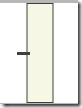
The StockDataPoint looks something like this:

blogimage5

Let's create a simple default template for our StockDataPoint that a designer can replace later.  The series will set the height of our stock data point and we want to ensure that our template scales gracefully to any size.  Let's start by creating a grid, splitting it into three columns, and inserting a rectangle in the middle.  This gives us the following visual appearance:

blogimage6

Now let's add another grid on top and divide in into four columns. 

blogimage7

We want to insert our line into the second column so that sticks out of the left-hand side of the rectangle.  We would also like it to stretch to the full width of the column it is in.  Unfortunately if we set the line to stretch it will do so vertically and horizontally which means that it will always appear in the center of the column like so:

blogimage8

This won't do because we need to be able to change the vertical position of the line based on the "Close" value.  To accomplish this we nest the line inside of another grid.  By setting the vertical alignment of this grid to top and the vertical alignment of the line to bottom we can control the vertical position of the line by adjusting the height of the inner grid.

blogimage9

Voila.  It's not too pretty but that's not important because a designer can replace it with something really impressive later. 

Let's take a look at the default style XAML in "generic.xaml."

<Style TargetType="local:StockDataPoint"> <Setter Property="Width" Value="10" /> <Setter Property="Background" Value="Beige" /> <Setter Property="Foreground" Value="Black" /> <Setter Property="Template"> <Setter.Value> <ControlTemplate TargetType="local:StockDataPoint"> <Grid Width="{TemplateBinding Width}" Height="{TemplateBinding Height}"> <Grid> <Grid.ColumnDefinitions> <ColumnDefinition /> <ColumnDefinition /> <ColumnDefinition /> </Grid.ColumnDefinitions> <Grid.RowDefinitions> <RowDefinition /> </Grid.RowDefinitions> <Rectangle Grid.Column="1" Grid.Row="0" Fill="{TemplateBinding Background}" Stroke="{TemplateBinding Foreground}" /> </Grid> <Grid> <Grid.ColumnDefinitions> <ColumnDefinition /> <ColumnDefinition /> <ColumnDefinition /> <ColumnDefinition /> <ColumnDefinition /> </Grid.ColumnDefinitions> <Grid.RowDefinitions> <RowDefinition /> </Grid.RowDefinitions> <Grid VerticalAlignment="Top" Grid.Row="0" Grid.Column="1" Height="{TemplateBinding CloseCoordinate}"> <Line VerticalAlignment="Bottom" X1="0" Y1="0" Stretch="Fill" X2="1" Y2="0" Stroke="{TemplateBinding Foreground}" StrokeThickness="3"> </Line> </Grid> </Grid> </Grid> </ControlTemplate> </Setter.Value> </Setter> </Style>

We expect the StockSeries to size and place the data point such that the top is at the high position and the bottom is at the low position.  The series will also set the "CloseCoordinate" property of our StockDataPoint to the correct value when it updates a data point.  This will control the vertical position of the line.

Now let's create a StockDataPoint class which inherits from Control:

public class StockDataPoint : Control { public StockDataPoint() { this.DefaultStyleKey = typeof(StockDataPoint); } public DateTime Date { get { return (DateTime)GetValue(DateProperty); } set { SetValue(DateProperty, value); } } public static readonly DependencyProperty DateProperty = DependencyProperty.Register( "Date", typeof(DateTime), typeof(StockSeriesDataPoint), new PropertyMetadata(default(DateTime))); public double High { get { return (double)GetValue(HighProperty); } set { SetValue(HighProperty, value); } } public static readonly DependencyProperty HighProperty = DependencyProperty.Register( "High", typeof(double), typeof(StockSeriesDataPoint), new PropertyMetadata(0.0)); public double Low { get { return (double)GetValue(LowProperty); } set { SetValue(LowProperty, value); } } public static readonly DependencyProperty LowProperty = DependencyProperty.Register( "Low", typeof(double), typeof(StockSeriesDataPoint), new PropertyMetadata(0.0)); public double Close { get { return (double)GetValue(CloseProperty); } set { SetValue(CloseProperty, value); } } public static readonly DependencyProperty CloseProperty = DependencyProperty.Register( "Close", typeof(double), typeof(StockSeriesDataPoint), new PropertyMetadata(0.0)); public double CloseCoordinate { get { return (double)GetValue(CloseCoordinateProperty); } set { SetValue(CloseCoordinateProperty, value); } } public static readonly DependencyProperty CloseCoordinateProperty = DependencyProperty.Register( "CloseCoordinate", typeof(double), typeof(StockSeriesDataPoint), new PropertyMetadata(0.0)); }

The "Date" property stores the date on which the data in the data point was collected.  This value will be used to determine where the data point appears on the X axis.  It is sometimes called the independent value.

The "High", "Low", and "Close" values are called dependent values, because they depend on the date on which they are taken. 

The "CloseCoordinate" property is the vertical coordinate relative to the top of the data point where the line in the data point located.  Our StockSeries class will set this value to the location of the Close property as reported by the Y axis.

A Designers Dream

Now we've empowered designers by giving them ability to completely change the appearance of our series and data point controls using Microsoft Expression Blend.  If you're lucky enough to have an in-house designer they could even get started right away while you finished implementing the series.

Coming in Part 2:  We implement the StockSeries class and starting charting some data!

Coming in Part 3: We make our StockSeries dynamic, responding to changes in the underlying data source with smooth animations.

Saturday, February 21, 2009

Flex's Achilles Heel

When we evaluate rich Internet platforms we tend to focus on the tip of the iceberg, even more so than in conventional software.  After all rich Internet applications are about graphics, animation, and other multimedia right?  By these measures it it is hard to deny that Silverlight and Flex are very evenly matched - for now.  However Flex developers are beginning to notice that Flex lacks a feature that will become increasingly important: Threading

Retrofitting Flex to make it a suitable platform for multithreaded programming is a very hard problem because of its heritage as a vector animation platform .  Assuming that Adobe is willing to go through this painful step the job of making Flex a hospitable platform for multithreaded programing will be far from complete.  Why?

Making it  possible to do threading is a platform problem. Making it easy is a language problem.

Microsoft made a key decision to develop their own programming languages and they've evolved them in ways that make them extremely well-suited to multi-threaded programming.  The results are pretty spectacular.  Here are two examples (coming soon to Silverlight):

1.  Parallel Linq

Parallel Linq is Linq provider that will execute a query in parallel.  In some cases parallelizing a query can be as easy as adding "AsParallel" to it like so:

var q = from x in list.AsParallel() where x < 3300 select x;

It just doesn't get much easier than this.

It is interesting to note that it is the programming language that makes this possible.  Parallel Linq relies on C# and VB.net's ability to convert Linq expressions into data.  The Parallel Linq library then analyzes the expression at run-time and determines the best way of executing it.

2.  F#

F# is an extended version of OCaml.  Microsoft research added a feature to the language which makes it incredibly easy to write asynchronous applications.  This is important given that Rich Internet applications spend a whole lot of time waiting on IO.

Let's take a look at an example of F# function which synchronously retrieves the HTML of a web page:

let getHtml(url:string) = let req = WebRequest.Create(url) use resp = req.GetResponseAsync() use stream = resp.GetResponseStream() use reader = new StreamReader(stream) reader.ReadToEnd()

You can think of the "let" key word is equivalent to C#'s "var" and the "use" keyword as equivalent to C#'s "using."  Now let's take a look at what it takes to make this function asynchronous.

let getHtml(url:string) = async { let req = WebRequest.Create(url) use! resp = req.GetResponseAsync() use stream = resp.GetResponseStream() use reader = new StreamReader(stream) return reader.ReadToEnd() }

Can you spot the differences?  The obvious one is the "async."  Less obvious is the "!" in from of the use keyword.  Whenever a "!" is placed in front of a keyword inside of an "async", the operation is executed on another thread and the rest of the computation is suspended until the operation finishes.  When the operation finishes control jumps from one thread to another and the rest of the computation is executed.  No threading code necessary.

Once again it's the language that makes this possible.  How's it done?

In certain contexts F# allows you to overload language keywords and have a custom function execute them instead of the programming language.  This makes it possible to do very complex types of transformations.  In this case the execution of "use!" is handled by a Use method on an instance of the AsyncBuilder class.  It turns out that"async" isn't a keyword, it is actually just an instance of type AsyncBuilder!

This is somewhat similar to implementing the query pattern in C#.The principle difference is that F# supports many more keywords.  To find out more check out Don Syme's talk on asynchronous workflows on Channel 9.

A Blessing in Disguise

A few months ago there was quite a bit of controversy when efforts towards JavaScript standardization fell apart.  In retrospect I believe that this is the best thing that could've happened to Adobe.  They are now free to extend JavaScript to make it a more suitable language for multi-threaded programming.

The real question is: Will they? 

I've been disappointed by the evolution of JavaScript.  Many of the features recently added seem to be inspired by Python, which is not surprising given the similarities between the two languages.  Although Python is a great language for doing dynamic, imperative development it is certainly not my first choice for doing functional programming, and by extension multi-threaded programming.  Unfortunately Javascript seems to have inherited some of Python's mistakes.  For example Javascript adopted Python's iterator model which is inferior to that of .NET's Enumerable model but that's another blog post entirely. :-)

In the interest of making multi-threaded programming (and a host of other problems in different domains) easier I'd add two features to ActionScript:

1.  Code-to-data transformations (which makes Parallel Linq possible)

2. Monad comprehensions (which F# uses to transform synchronous code into asynchronous code)

If Flex stays a one language platform and Actionscript continues to evolve in Python's direction instead of Haskell's direction I see a grim future ahead for the platform.  I hope I'm wrong because competition is a healthy thing :-).

Thursday, January 29, 2009

F#: Real Sharp

Eric Lippert's recent post on C#'s inability to infer the type of fields in classes is the perfect opportunity to contrast C# and F#.  As Erik points out you can't do this in C#:

class Customer { const age = 20; private var name = string.Empty; }

It seems that Eric has been getting a little flack from C# developers who want smarter type inference in their language.  I find this amusing as type inference was perhaps the most controversial of all the features ever added to C#.  No doubt some of the controversy was due to misinterpretations of var's meaning, with many believing it was a way of adding dynamic typing to C#.  However there were a great many developers that were genuinely concerned that the availability of the "var" keyword would allow their peers to write inscrutable code.

"I'm going to take a shower...in the bathroom."

Fast forward a few years and it's clear that the sky hasn't fallen.  In retrospect the benefits of type inference are obvious.  In everyday communication when tend to leave out information that can be readily inferred based on context.  For example we don't often find ourselves saying things like this:

"Sure I've read 'War and Peace'...the book."

Such pronouncements would no doubt be considered by others to be bizarre at best, and mildly condescending at worst.  Of course if there is the potential for misinterpretation we add supplementary information:

"Sure I've read 'War and Peace'...the comic."

Static typing was originally introduced to help compilers verify code correctness, not to enhance code clarity for developers.  As opposed to clarifying code, repetitive type information tends to obscure its meaning by lowering the signal-to-noise ratio.   Quick, what does the following code do?

Enumerable.Range(0, 365) .Select<int, DateTime>(new Func<int, DateTime>(day => new DateTime(2000, 1, 1).AddDays(day))) .Where<DateTime>(new Func<DateTime, bool>(x => x.DayOfWeek == DayOfWeek.Friday && x.Day == 13)) .GroupBy<DateTime, int>(new Func<DateTime, int>(date => date.Month / 4));

Well obviously it takes all the days in 2000, finds all the friday the 13ths, and groups them by quarter.  You might think that no programming language would impose such a heavy burden on its developers but Java 6 does.  Although it is technically possible to write Linq-style code in Java 6, the language's inability to do type inference forces you to write something like the code above.  Despite the fact that replacing a loop with a Linq query adds several technical advantages (no state bugs, can be parallelised, etc) it would be irresponsible to do so.  The problem is that the decreased code clarity of the superior solution outweighs its advantages.  We must never forget that code is for human beings to read first and foremost.  This example shows that the real benefit of type inference is not that it saves us keystrokes, but that it enables us to express new, more complex abstractions.

The Best of All Worlds

Imagine if you could remove 90% of the type declarations in your code, leaving almost nothing but type conversions, constructor calls, and logic.  What if your code could be as concise and readable as Python code but as fast as C# code?

Let's take a look at a simple example.

public static IEnumerable<T> QuickSort<T>(this IEnumerable<T> list) where T : IComparable { if (!list.Any()) { return Enumerable.Empty<T>(); } var pivot = list.First(); var smaller = list.Skip(1).Where(item => item.CompareTo(pivot) <= 0).QuickSort(); var larger = list.Skip(1).Where(item => item.CompareTo(pivot) > 0).QuickSort(); return smaller.Concat(new[] { pivot }).Concat(larger); }

This is a simple recursive quick sort routine written in C#.  Now let's take a look at the same algorithm in F#:

let rec quicksort list = match list with | [] -> [] | x::xs -> quicksort [for item in xs do if (compare item x) <= 0 then yield item] @ [x] @ quicksort [for item in xs do if (compare item x) > 0 then yield item]

To ensure a fair comparison I'll explain the syntax a little bit.  F# is whitespace-aware which removes the need for all those brackets.  Just adding an new level of indent is enough to signal a new block to the compiler.  The "rec" modifier indicates to the compiler that this function is recursive. 

The first operation is a pattern match.  F# allows you to match objects against literal declarations which makes for extremely readable code. If the list is an empty list ([]) then an empty list is returned. The "x::xs" is a pattern that means "the first item in the list as x, and the rest of the items as xs".  This makes sense when you learn that in F# you can create a list like this:

let myNewList = 1::[2; 3; 4] // this creates a new list [1; 2; 3; 4]

The "@" operator is a list concatenation operator and the list comprehensions should be straightforward to anyone familiar with Linq. 

Now that you can read this code and understand what it is doing there are a few things to notice here:

1. There are no type declarations whatsoever

F# can tell that the list parameter is a list based on the fact that an attempt is made to match it against an empty list.  Neat trick huh?

2.  The return type of the method is inferred.

Why wouldn't it be?

3. There are no type constraints specifying that the type of list must inherit from IComparable.

In F# all methods are generic by default.  If you pass a parameter to another function then F# tries implicitly adds a constraint that the parameter's type must inherit from the type of that function's argument.  Sometimes F# will not have enough information to infer the type of a method parameter in which case you can just specify the type:

let getChars (str:String) = str.Chars

However if you pass the method parameter to another function F# can usually infer what its type is:

let getChars str = str + "a"

Beautiful Code

In F# type declarations are the exception, not the rule.  You will find that F# does a surprisingly good job of inferring the type of your variables.  In fact I have written a few non-trivial data structures in F# without specifying any type information whatsoever.  I was concerned at first that the lack of explicit type declarations would make my code more difficult to follow but the opposite has proven to be true.  F# code is much easier for me to understand than C# code.  In fact, it's not even close.

It's not just the lower signal-to-noise ratio either.  Although type inference is an integral feature, pattern matching and recursion also force code into a predictable, declarative structure.  All of F#'s idioms work in harmony to create beautiful code and that's why I love it.

P.S. It also has no problem whatsoever with this :-) :

type Customer() = let mutable name = String.Empty let age = 20

Saturday, January 24, 2009

Much Ado About Nothing

When I started at Microsoft a few months ago there was a brief discussion of the pro's and con's of exposing Nullable property values in our controls. On one hand, nullables are awkward to work with in some languages (read: C#) and are poorly understood by some of our customers. On the other hand the inability to express "no data" is an impedance mismatch when data-binding to data retrieved from a database.

In the end we chose to embrace nullable values and I'm glad because the fact that WinForms controls didn't use them caused me tremendous pain in my former position as an app developer. That said it can't be denied that working with nullables can be a pain, especially when you don't care about the distinction between a null value and the default value. Someone ran into this problem on the Silverlight Discussions mailing list today and I thought of a trick that hadn't occurred to me before: use an extension method.

public static T ValueOrDefault<T>(this Nullable<T> that)
where T : struct
{
if (!that.HasValue)
{
return default(T);
}
return that.Value;
}

Now we don't have to remember to check for nullness before pulling a value out of a nullable property to avoid a potential NullReferenceException. In short this...

if (myCheckbox.IsChecked != null && myCheckbox.IsChecked.Value)
{
// ...
}

...becomes this...

if (myCheckbox.IsChecked.ValueOrDefault())
{
// ...
}

...and hopefully nullables just got a little less awkward.

-- Edit. I completely missed the GetValueOrDefault method on Nullable. Oops.

Friday, December 19, 2008

Haskell for C# Programmers Part 3: Visualizing Monads

Today I'll be explain what monads are, what they're good for, and how to build one of your own. One of the interesting things about monads is that they're relatively new.  They were first used in  programming languages about 20 years ago and are only just now making their way into a languages you have much chance of getting paid for using.

"Why do I need to learn about them?"

There is very little you can do in Haskell without understanding monads.  As I explained last time Haskell uses them for IO, without which programs are frightfully dull.  Unfortunately it is rather hard to learn a new programming language and a completely foreign concept at the same time, which is why learning Haskell can be daunting.  C# programmers have a leg up though.  They use monads all the time.  Surprisingly C# has a built-in syntax for working with Monads: Linq.

"Linq's for querying data.  What does that have to do with monads?"

On the contrary, Linq is just a general syntax for constructing monads.  It was made to look like SQL in order to make it feel more familiar to developers.

"You sir, are blowing my mind."

It's true.  In the previous post I showed that Linq expressions could be used to create and manipulate Haskell's IO monad.  Using Linq statements we composed several procedures that performed IO operations into one large procedure and then ran it.  That's not exactly what you normally think of as a query is it?

"I suppose not.  So what are monads?"

If you've written object-oriented code you've constructed objects with functions.  I've you written functional code like a Linq query then you have manipulating functions with other functions.

Monads are functions that are constructed with functions.*

"But Linq programs manipulate IEnumerable objects, not functions."

Don't be fooled.  The IEnumerable object is just a convenient wrapper for the IEnumerator.MoveNext function which does the work.  Although not strictly necessary, wrapper objects are usually defined to encapsulate monadic functions.  This is useful because it allows us to give the monad a nice readable type name that conveys its purpose (ex. IEnumerables are for enumerating).  Creating wrapper objects also makes it easy to use static typing to prevent attempts to compose two monads not meant to be composed (ex. IEnumerable monads shouldn't be combined with IO monads).

The following animation demonstrates how several IEnumerable monads are composed into one big IEnumerable monad with a Linq query.  After the IEnumerable monad is composed, the animation demonstrates what happens when it is run.

Monads have been likened to onions and matryoshka dolls.  From the animation above you can see why.  When you apply a bind two monadic functions together you get a new one that encapsulates them.  When the monad function is run each function runs its inner functions until the inner-most function is executed.  This function returns a result.  Then each monad applies some transformation to the result of its inner monad and returns that value.  This continues until finally the result is returned from the outer-most monad. 

"Why would I want to build a function this way?"

When you bind two monads of the same type together you get...another instance of the same monad.  Think about it.  If I select from an IEnumerable I get...an IEnumerable.  When you bind two IO monads together you get an IO monad and so on and so forth.  This is a very elegant, predictable way of structuring a program and a great way of controlling the complexity of your code. 

"So how do I know if a function is monadic?"

The first time I read the mathematical criteria for a monad I was awfully confused.  I will attempt to describe the rules for determining if a function is monadic in plain english and provide examples so as not to perpetuate this uncomfortable state.

A function is monadic if*:

1.  There exists a function which can construct it.

IEnumerable<int> numbers = new []{2};

2.  There exists a function which can retrieve a value from it.

int[] number = numbers.ToArray();

3.  There exists a function that can bind two monads together and produce another instance of the monad.

public static IEnumerable<R> SelectMany<T,R>( this IEnumerable<T> that, Func<T, IEnumerable<R>> func) { foreach(var item in that) { foreach(var nestedItem in func(item)) { yield return nestedItem; } } }

The first two should be straight forward because everyone knows how to get data into and out of an IEnumerable.  The last function might strike you as a bit funny.  This SelectMany function is a Linq function and although you are probably unaware of it you use it all the time.  The compiler calls it under the hood when you join two lists.  Turns out that the bind function for two IEnumerables is a join.  After all when you join two IEnumerables you get...well a new IEnumerable.  Sound familiar?

Take the following Linq query...

var pairs = from left in Enumerable.Range(0,3) from right in Enumerable.Range(3,6) select new {left, right};

The code above translates to...

Enumerable.Range(0,3).SelectMany( left => Enumerable.Range(3,6).Select( right => new {left, right}));

Take a minute to absorb this.  Nested functions can be very difficult for developers who are accustomed to imperative development.

"Okay...I think I get this but I'd like to see another example."

Okay.  Let's take a look at the code required to build Haskell's IO monad in C#.  First we'll define the monad.  No need for a wrapper class. A delegate type should suffice just fine.

delegate T IO<T>();

Okay that was easy enough.  Since our monad is just a delegate it's easy enough to construct one...

IO<object> helloMonad = () => { Console.WriteLine("Hello monad."); return null; };

Getting a value out (in this case null) is even easier.

helloMonad();

Now comes the hard part.  We need to write the bind function.  The Bind function uses a transformation function to create a new IO monad that encapsulates an existing one IO monad. 

public static IO<R> Bind<T, R>(this IO<T> io, Func<T, IO<R>> func) { return func(io()); }

As you can see, Bind runs the monad, gets the result, passes it to the transformation function, and returns the output, which is the transformed monad.  Unfortunately we're not done.  The C# compiler wants us to define one more overload.  If we want to transform the output of our composed monad with another function the compiler calls the following overload to avoid adding another layer of nesting.

public static IO<V> Bind<T, U, V>( this IO<T> io, Func<T, IO<U>> io0, Func<T, U, V> io1) { return io.Bind( value0 => io0(value0).Bind( value1 => new IO<V>(() => io1(value0, value1)))); }

Once again the function above is entirely redundant and is just a performance optimization.  Any code you can write with the latter can also be written with the former.

"Umm...I'm not sure I follow."

I know.  It's complicated.  The bind operation is perhaps the most difficult part of monads to understand.  Just keep in mind that bind takes two monadic functions, f and g, and composes them together, making a new one h.  The result of h(x) x is the same as calling g(f(x)).

"So how does Linq know how to compose my IO monad?  It doesn't implement IEnumerable."

Good observation.  In fact query comprehensions don't actually rely on the IEnumerable interface.  They rely on method name patterns.  For example the "select" keyword causes the C# compiler to look for a method named Select on the object it is manipulating.  If you attempt to bind two monads together the C# compiler converts that into a call to SelectMany. 

Therefore all we have to do to compose our IO monad with Linq is rename the Bind function to SelectMany!  Then we can construct our IO functions using Linq.

static IO<object> RealMain(string[] args){ return from address in GetAddressFromConsole() from html in GetHtml(address) from _ in WriteToConsole(html) select _; }

Notice that nothing has actually happened yet.  We've just constructed a new function that can be run and will return a value.

"This is really cool and all but when am I gonna learn some Haskell?"

I'm going to suspend this series here for two reasons:

The first is that there are many more good resources on the web for learning Haskell today than there were when I started this series many months ago.  My intent was to take advantage of the fact that C# and Haskell have so many similarities (anonymous types, lambda functions, and Linq which actually comes straight from Haskell) to get C# developers off the ground.  Hopefully you've not only gotten a good introduction to monads and Haskell syntax, but you've also gained a newfound respect for C#. 

The other reason I'm suspending this series is that I believe most .NET developers are more interested in Microsoft's new functional language, F#, which is available today and will be released with the next version of Visual Studio.  F# will sit alongside C# and VB.NET as a fully supported .NET language.  The good news is that everything you've just learned about Haskell and functional programming applies to F#.  The languages have a very similar syntax and share the same idioms.  I look forward to posting about F# in the near future.

*I'm aware that in explaining what a monad is I've managed to be at once too broad and too narrow.  Please know that I'm aware of this and have taken some creative license to make things as clear as possible.

About Me

My photo
I'm a software developer who started programming at age 16 and never saw any reason to stop. I'm working on the Presentation Platform Controls team at Microsoft. My primary interests are functional programming, and Rich Internet Applications.